
Be yourself; Everyone else is already taken.
— Oscar Wilde.
This is the first post on my new blog. I’m just getting this new blog going, so stay tuned for more. Subscribe below to get notified when I post new updates.
Be yourself; Everyone else is already taken.
— Oscar Wilde.
This is the first post on my new blog. I’m just getting this new blog going, so stay tuned for more. Subscribe below to get notified when I post new updates.

-When the Television set came to my house, I forgot how to read books. I kept them aside and only concentrated on TV, the Idiot-box.
–When the car came to my doorstep, I forget how to walk and simply went everywhere by car not allowing my legs to walk and enjoy the nature.
–When I got the mobile in my hand, I forgot how to write letters nor have a decent dialogue or conversation. Became rude and irritable with friends and family. I only kept on seeing my mobile from morning to dusk.

–When computer came to my house, I forgot spellings because the computer did everything for me. The typewriters became obsolete.
–When the AC came to my house, I stopped going under the tree for a cool breeze and started the artificial breeze which was so stifling after sometime.
–When I stayed in the city, I forgot the smell of mud of the life in the village which was so good for my breath and well-being. The freshness in the air disappeared leaving me breathless and stressful.
–With the smell of perfume, I forgot the fragrance of fresh flowers that adds fresh perfumes in the house and everywhere.
–With the coming of fast food restaurants, I forgot to cook traditional cuisines because everyone wanted to simply eat the food which was not good for overall health but they still did.
Today in this era, we are always running and running around at a fast speed. New technology has swept us from our feet and today we want quick results. In the olden days when technology had not taken us by storm we were so grounded on the Earth.
We have stopped talking, only we are conversing with messages in a virtual world but have completely forgotten how to stop and reflect, how to be at peace with our Being and enjoy relationships be it family, friends or the environment. These are the side effects of modern technology and it has made a Human Man into a Human Robot.
STEP1: CLICK ON THE SLIDE YOU WANT TO CONVERT

STEP 2: CLICK ON FILE


STEP 3: CLICK ON SAVE AS

STEP 4: CLICK ON DESKTOP

STEP 5: CLICK ON SAVE AS TYPE

STEP 6: CLICK ON JPEG File Interchange format
STEP 7: CLICK SAVE

If you are interested in downloading movies and some TV series but you can’t because of the country you are living in, I will teach you how to download movies irrespective of the country on windows, android and Mac/Ios.
To download movies on android,mac and windows,you have to try these 3 methods
Method 1; Using Free Movie Sites
Many of the free movie sites have offerings that include shorts, classics, foreign language, and other public domain content. Sites that offer free movies include:
* The Internet Archive: https://archive.org/details/feature_films
* Free Movies Cinema: https://www.freemoviescinema.com
* Vimeo: https://vimeo.com
Use the following steps to download your movie;
STEP 1:
CLICK ON ONE OF THE FOLLOWING URLs ABOVE
STEP 2:
Search for a movie; Use the site’s search function or simply browse the available content.
STEP 3:
Check to see if the movie is avaliable for download; Not all streaming content is available for download.
STEP 4:
Select the movie quality and format; Many movies are available in formats that range from low (360 dpi) to high (1080 dpi) resolution, as well as different file formats, such as MP4, MP2, WMV, or MOV. Higher-definition movies will use more storage on your device.
STEP 5:
Download the movie: You can watch most movies from most services on your desktop computer immediately.
METHOD 2:Using Bit Torrent
STEP 1:
Download and install a BitTorrent client. BitTorrent is one of the most effective and popular methods for downloading large files on the internet and is, therefore, a popular method for download movies. It requires a BitTorrent program (referred to as a BitTorrent client) to download files, and a BitTorrent search engine website (referred to as a torrent tracker) to search for a movie.
* Popular BitTorrent clients include uTorrent, qBittorrent, Transmission, Deluge, and Tixati.
STEP 2:
Be aware of the dangers. In most countries, downloading a movie that you have not purchased legitimately is a violation of copyright laws and you can face massive fines and even jail time. By default, your IP address is not hidden when using BitTorrent and could result in penalties from your Internet Service Provider.
STEP 3:
Search for a movie on a BitTorrent search engine. There are many popular torrent tracker sites and torrent search engines that can be used to find torrent files, but you can also use regular search engines, like Google, as well. Many torrent tracker sites and torrent search engines contain invasive ads, graphic adult material, and can sometimes have files that contain malware or viruses. Find a safe and reputable source before downloading anything.
http://www.publicdomaintorrents.info has only legal movies that you can download using BitTorrent and is a good place to start.
STEP 4:
Open the torrent file with your BitTorrent client. Double-click on the torrent file to load it into your torrent client. Depending on your settings, the download should begin automatically.
STEP 5:
Open the movie file. Once the torrent has finished downloading, your client software will save the video file to the location you indicated.
METHOD 3: Using On-Demand Services;
STEP 1:
Choose an on-demand service to fit your needs. Some subscription based services, such as Netflix, charge a monthly fee to let you to stream movies instantly as well as download them to your computer so you can watch them offline. Other services, such as iTunes and Google Play, offer movies that you can purchase and download individually with no monthly fee. And some services, such as Amazon Video, offer both options. Some of the popular on-demand movie services are:
iTunes Store (requires the iTunes app for desktop or the iTunes Store app for mobile)
YouTube: https://www.youtube.com
STEP 2:
Go to the service’s website or open the app on your smartphone. Once you’ve decided which on-demand service you want to use, go to their website in a web browser or download the corresponding app on your smartphone.
STEP 3:
Sign in or create an account when prompted. Most movie sources require you to have an account before you can access their content.
Many streaming services offer free trials when you sign up but will eventually require paid subscriptions.
STEP 4:
Browse the movie content and select the movie you want to download.
STEP 5:
Check to see if it’s available for download. Not all streaming content is available for download:
How to check availability for download from Netlfix
How to check availability for download from Amazon
STEP 6:
Select the movie quality. Many movies are available in both standard (SD) and high (HD) definition formats. HD movies tend to be more expensive and will use more room on your device.
STEP 7:
Decide whether to rent or buy the movie. Apple iTunes, Google Play, Amazon, and CinemaNow offer movies for both purchase and rental.
Rental pricing and terms vary by source. Compare pricing among the different sources to make sure you’re getting the best deal.
STEP 8:
Download the movie. You can watch most movies from most services on your desktop computer immediately. To get them to your mobile device, you’ll usually need the proprietary app available from the Apple App Store, the Google Play Store, or the Amazon App Store. To watch on your TV, you may want or need additional equipment such as AppleTV, Google Chromecast, Amazon FireTV, Roku, or a smart TV.
Have you ever tried to download youtube videos or wondered if there is a way or an app to perform this action,fortunately there is a way through the help of INTERNET DOWNLOAD MANAGER
To download this app, go to your browser and type http://www.getintopc.com. Click on search and type internet download manager, download and launch the app,and go back to your browser. This time, you would see a notification asking for the permit for IDM to access the browser and click yes.
Now that you have finished the setup, it’s time to download some youtube videos. Go to youtube.com and search for the video you want to download.
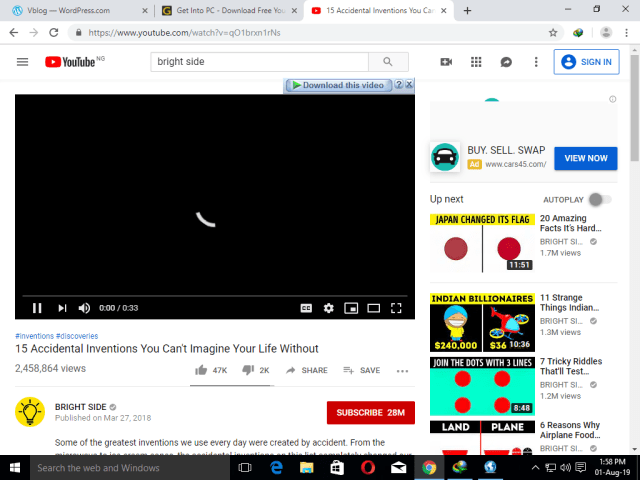
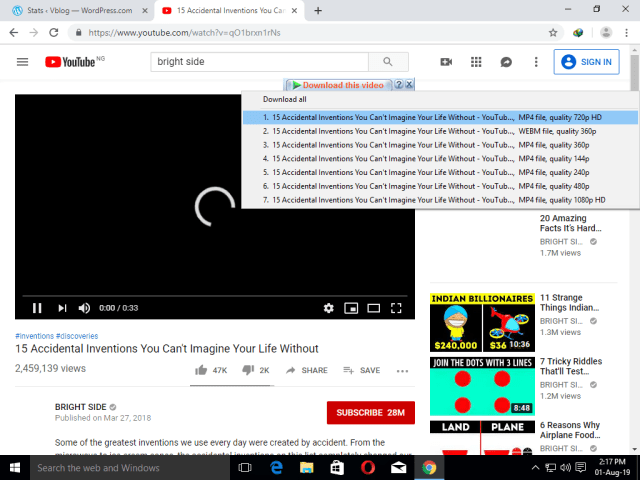
Click on the “Download this video” button.
If you want to download in high definition, click on either 720 pixels or 1080 pixels

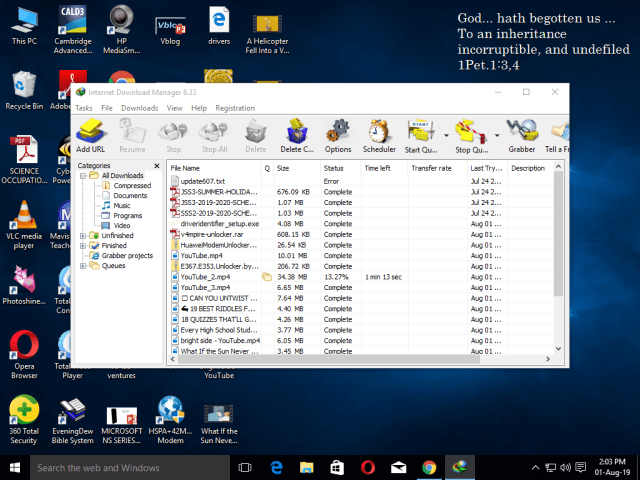
To view your downloaded video open IDM and click on downloads and click on the video you want to watch.

There are certain hotkeys that a pc user should technically know about and there are 6 of them 1.CREATING A VIRTUAL DESKTOP : Imagine you have been working on a particular project all day long when you need to deal with another task immediately, opening new tabs will just slow you down and mess up your work flow so you need to create a fresh new clean desktop.
Well for windows, just press the windows key+CTRL+D while for Mac OS, just press CONTROL+UP
2.SWITCH BETWEEN VIRTUAL DESKTOPS:If you do not know how to switch between virtual desktop then you do not need to worry as it is really simple. All you need to do is to press the WINDOWS KEY+CTRL for windows and press the CONTROL key for MAC. Now you can switch between the virtual desktops on both WINDOWS and MAC by using the left and right arrow button.
3.CLOSING VIRTUAL DESKTOPS: When you are done with your project and you want to close the virtual desktops you created, all you need to do is to press the WINDOWS KEY+CTRL+F4 FOR WINDOWS and for MAC hold down the OPTION KEY +the”X” sign. 4. RETURN TO THE DESKTOP FROM APPS: If you have to open an app without minimizing all those other apps one by one but you can minimize all these by pressing the WINDOWS KEY+ M.
5. VIEW DESKTOP: To perform this action,press the WINDOWS KEY+COMMA and on MAC press COMMAND+F3
6. SWITCH APPS: Press CTRL + ALT+ TAB on windows and press CONTROL+ TAB on MAC.
This is an example post, originally published as part of Blogging University. Enroll in one of our ten programs, and start your blog right.
You’re going to publish a post today. Don’t worry about how your blog looks. Don’t worry if you haven’t given it a name yet, or you’re feeling overwhelmed. Just click the “New Post” button, and tell us why you’re here.
Why do this?
The post can be short or long, a personal intro to your life or a bloggy mission statement, a manifesto for the future or a simple outline of your the types of things you hope to publish.
To help you get started, here are a few questions:
You’re not locked into any of this; one of the wonderful things about blogs is how they constantly evolve as we learn, grow, and interact with one another — but it’s good to know where and why you started, and articulating your goals may just give you a few other post ideas.
Can’t think how to get started? Just write the first thing that pops into your head. Anne Lamott, author of a book on writing we love, says that you need to give yourself permission to write a “crappy first draft”. Anne makes a great point — just start writing, and worry about editing it later.
When you’re ready to publish, give your post three to five tags that describe your blog’s focus — writing, photography, fiction, parenting, food, cars, movies, sports, whatever. These tags will help others who care about your topics find you in the Reader. Make sure one of the tags is “zerotohero,” so other new bloggers can find you, too.
Have a WordPress.com account? Log in now.

